In order to send Marketing templates (Utility templates are excluded from this process) to candidates via WhatsApp Business Platform it is necessary to obtain their privacy consent within the platform.
It is therefore necessary to proceed with the creation of the specific privacy notice, which must then be enabled in the job application registration forms, in the spontaneous application form, and in the candidates’ reserved area, in order to properly collect their consent.
To create the privacy notice, it is necessary to access the section Settings > Privacy & Security > Privacy > Privacy policy > click on the pencil icon next to a notice not yet used > tick the option "WhatsApp marketing" in order to enable the notice for storing such information.
NB: this configuration is not retroactive and therefore candidates will need to explicitly accept the notice.

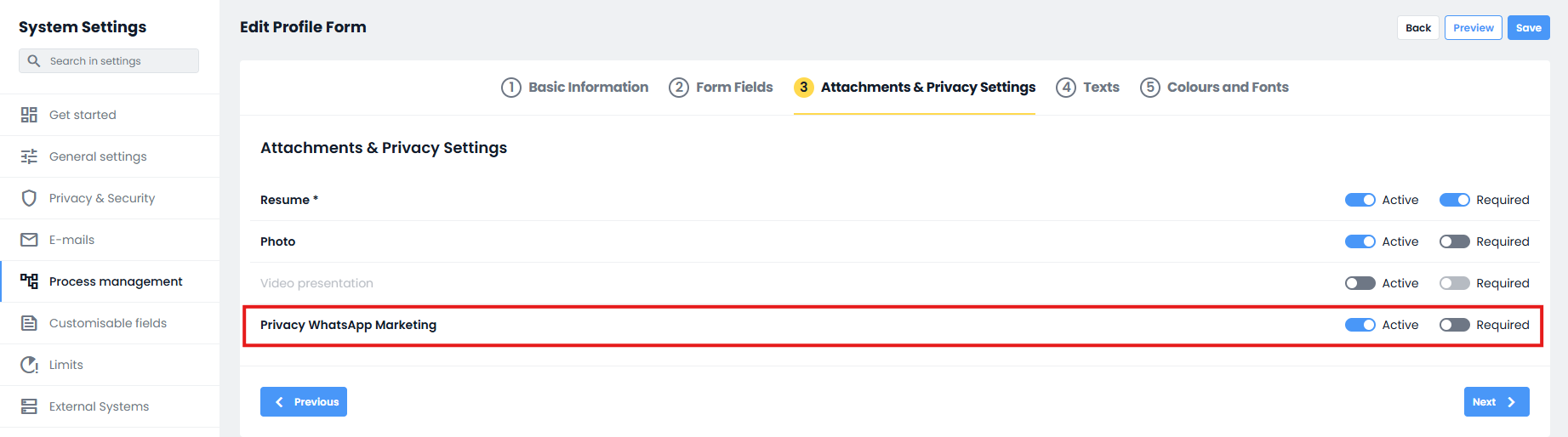
By accessing the section Settings > Process Management > Application Forms > Candidate Forms it will then be necessary to enable the created privacy in the specific forms you want to use, by editing them and, from Tab 3 Attachments & Privacy Settings, ticking the related option.
During registration, candidates will be presented with the enabled notices as checkboxes, allowing them to accept such consents.

If the notices are enabled in the INTERNAL form, they will be visible and fillable by candidates within their reserved area.

Was this article helpful?
That’s Great!
Thank you for your feedback
Sorry! We couldn't be helpful
Thank you for your feedback
Feedback sent
We appreciate your effort and will try to fix the article