Segments consist of a group of candidates to which a specific Campaign for sending bulk communications via WhatsApp can later be associated.
From the side menu WhatsApp > Segments, the Company User will be able to:
- View the list of existing segments
- Add a new segment, i.e. a list of candidates to be later used as recipients for sending a templated bulk message
- View the details of the segments in the list
Viewing the WhatsApp Segments list
In the Segments screen, the list of all existing WhatsApp segments will be available.
For each segment, the following detailed information will be displayed:
- ID
- Segment Name
- Recipients: number of candidates included in the segment
- Last updated: date and time of the most recent update of the Segment
- Creation date: date and time when the segment was created
By clicking on the segment name, it will be possible to access the details of the candidates included in the segment, with the indication of Full Name, Validated mobile number, and the date the candidate was added to the segment.
Creation of a new segment
By clicking the Add segment button located at the top right of the WhatsApp Segments screen, a popup will open where the Company User can create a new WhatsApp Segment.
After entering a name and clicking the Add button, the new segment will be added to the Segments list screen.
Each newly created segment will be empty. The addition of recipient candidates to a segment must be done starting from the Candidates module.
Adding Candidates to a WhatsApp Segment
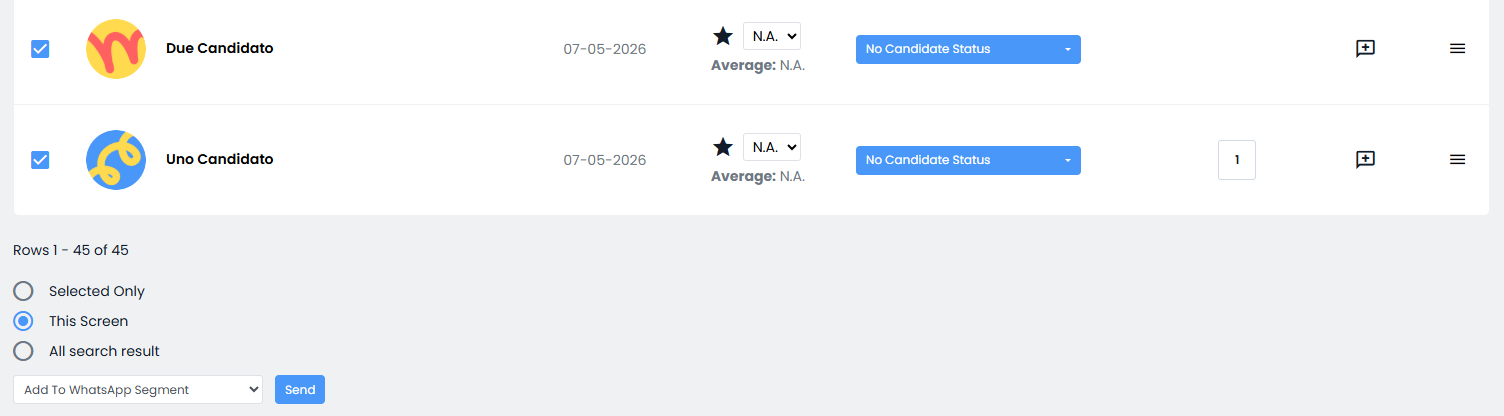
In any candidate list (Candidates > Search > Candidate search and in Candidates > Candidate lists > detail of a single list, Registered tab in the detail of a job posting, etc.), it will be possible to select one or more candidates and choose from the action menu at the bottom of the page the option "Add to WhatsApp segment" to add candidates to the desired Segment.
If candidates are added to a segment whose “Validated mobile number” field is not filled in / contains errors, the addition action will still be allowed, but a WARNING message will be generated: "You have added recipient candidates to the segment who do not have a validated mobile number and therefore cannot be contacted via WhatsApp".
The Company User will therefore need to manually correct these issues (by editing the field or removing the candidate from the segment).
Was this article helpful?
That’s Great!
Thank you for your feedback
Sorry! We couldn't be helpful
Thank you for your feedback
Feedback sent
We appreciate your effort and will try to fix the article