In the digital age, protecting personal data is a top priority for companies across all sectors.
A well-structured privacy policy not only ensures compliance with current regulations but also strengthens individuals’ trust in how their data is managed.
This guide will walk you step by step through the creation of an effective, clear, and legally compliant privacy policy, which each person must accept when accessing their personal area.
On the Privacy Texts page (Settings > Privacy and Security > Privacy Policy > Privacy Texts), you can enter the privacy notices that individuals must accept upon their first access to their personal area.

By clicking New Privacy Policy in the top right corner, you can create a new privacy notice.
In this screen, you can enter:
- The Title of the notice
- The Text
- Whether the notice should be active and mandatory
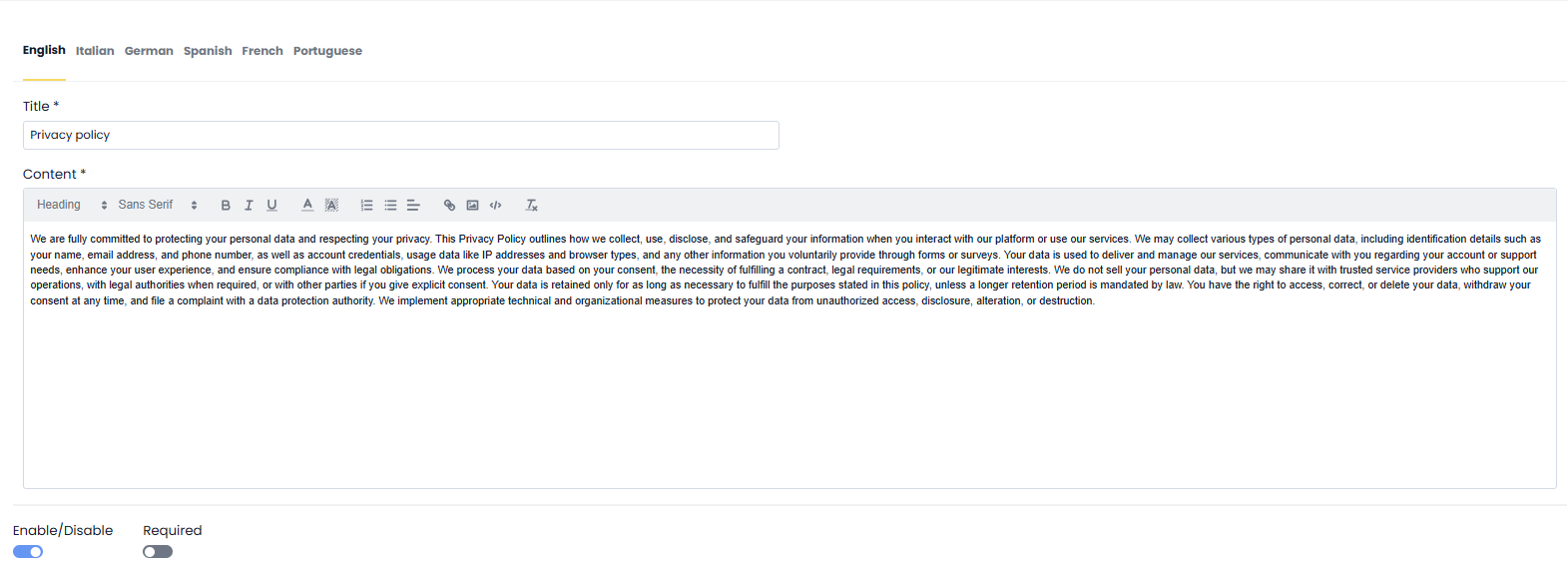
Once the required fields are filled in, simply click Save in the top right corner to complete the creation of the notice.
You will find your Privacy Policy in the list of notices:

In the All Privacy Policies tab, you will find all the privacy notices you have created, whether active or not:

In the Active Privacy Policies tab, only the notices with ACTIVE status will be displayed:

By clicking the icon , you can access and edit the privacy notices.

Was this article helpful?
That’s Great!
Thank you for your feedback
Sorry! We couldn't be helpful
Thank you for your feedback
Feedback sent
We appreciate your effort and will try to fix the article