Welcomin is a platform that allows you to create structured workflows divided into multiple steps, making it easy to collect information, display documents, images, and videos, and manage the completion and digital signing of forms.
Sending an invitation to complete a workflow is a key step in engaging the person in the process. Through this invitation, the individual receives personalized access to their private area, where they can complete the required actions in a guided and intuitive way.
The invitation to complete a workflow allows you to:
- Enable the person to activate their account and set a personal password.
- Guide them through the required data entry, ensuring an organized and error-free process.
- Provide access to documents or multimedia content needed for the workflow.
- Allow digital signing of important documents without the need for printing or manual delivery.
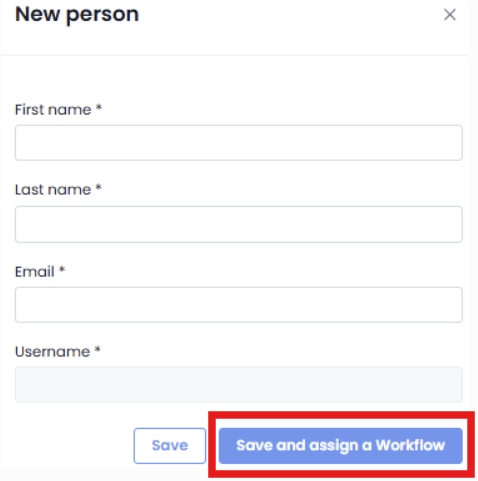
During person creation
When adding a new person to the system, you can click the "Save and Assign a Workflow" button.
This will automatically generate an invitation email containing the link to access the platform.
From the “People” section
By navigating to People > Assign a Workflow, you can select an already registered person and send the invitation.
In this case as well, the person will receive an email with the link to begin the process.

Once the person receives the email link, they will:
- Set their password to activate the account.
- Access their private area and accept the configured privacy policies.
- Fill in the required personal details (First Name, Last Name, Tax Code, Date of Birth, Place of Birth).
- Follow the workflow steps until the process is complete.
Thanks to Welcomin, the entire process is managed digitally, ensuring both efficiency and security.
Was this article helpful?
That’s Great!
Thank you for your feedback
Sorry! We couldn't be helpful
Thank you for your feedback
Feedback sent
We appreciate your effort and will try to fix the article